


9 Easy Ways To Automate Your Life And Eliminate Repetitive Tasks


We do so many of the same actions every day, and these actions often require decisions. However, the more decisions you have to make in any given day, the more drained you will feel as a result due to a phenomenon called decision fatigue. Even making seemingly trivial decisions like choosing your clothes can wear you down throughout the course of the day, detracting from your peak performance.
But there's a way to combat decision fatigue: automate your tasks. The idea behind automation is to plan things out ahead of time so that when the time for action comes, the action is completed automatically (or close to it). This frees up cognitive load, allowing you to focus your daily decision budget on more consequential decisions.
Below are some easy ways to automate your life in simple yet effective ways so that you can spend more time and energy on actions that actually require your attention and less time on easily replicable actions.
But What Should I Automate?
The best tasks to automate are ones that are the same or very similar in their requirements every time. The more variation there is in the task, the less benefit there will be in automating it because it will likely still require a fair amount of input on your part. But if you find yourself doing the same task over and over again with little-to-no variation, chances are you can and should automate it.
Set Up Automatic Bill Payments

Everyone has recurring bills to pay. Many of these recurring subscriptions are for services such as Netflix or the gym, where we're automatically charged. However, you likely have bills that are not automatically charged that instead need to be paid by certain dates, such as utilities, rent, or credit card statements.
Most of these recurring bills should have an option to set up automatic payments when billing time comes: take advantage of it. Not only do automatic bill payments save you from the occasional late fee, but they also free you from needing to take the extra step of submitting a payment, saving you time and mental bandwidth.
As a bonus, relying on automatic bill payments also forces you to stay accountable to your budget so that you have enough in the bank to cover those payments, which is crucial for maximizing your money for the things that matter.
Use Autofill and Text Expanders

Most browsers and operating systems (as well as password managers such as 1Password) come equipped with autofill, which will automatically fill in common fields in online forms such as email, password, first and last name, address, and even your credit card information. Using autofills can save you so much time spent repetitive information, all with the simple tap of a button.
Similarly if you find yourself typing out the same text over and over again, you should use a text expander application. These applications will allow you to turn a specific series of keystrokes into a full word, phrase, sentence, or even paragraph.
For instance, I do a lot of photo credits for work, and one of the companies I credit a lot is "Walt Disney Studios Motion Pictures." Typing this out became a nuisance after a while, so instead I set up a text expander link where whenever I type "walttt", it automatically expands the text to say "Walt Disney Studios Motion Pictures."

Of course this only scratches the surface of what's possible using text expanders. I also use them for my email address, common Google search terms, and more, so I recommend playing around with it yourself to see what common phrases you can replace.
Mac and iOS devices have a built-in keyboard replacement tool by going to Settings>Keyboard>Text Replacements. I also use the application Keyboard Maestro, which is an absolutely incredible tool for automating even the most minute tasks on Mac (and as much as I'd love to go more in-depth on this tool, it's outside the perview of this article).
Establish Organizational Systems

"A place for everything and everything in its place." When you have a place for everything, you're freeing yourself from having to think or worry about where to put everything.
That is why you should establish organizational systems such when anything new comes into your life -- be it clothing, a food item, or even a digital file -- you know exactly where to put it. This serves as a form of automation simply because you won't have to think about where it goes: you'll have thought about it ahead of time and it'll go in its rightful place (which can also save you time and headache if and when you decide to look for that item in the future).
That's not to say that you need to be obsessive about putting everything in its exact spot as soon as you receive it. I for one have both a drawer and a folder on my computer that I lovingly refer to as my "Organize Me" spots: when I know I want to keep something but don't necessarily want to put it away immediately (or if I don't yet have a place for it and need to create one), I'll stuff it in the appropriate "Organize Me" spot. That way I know it's stored safely awaiting proper organization.
Outsource Your Work Onto Others

Who says an automation has to be tech-based? Automation is all about doing more without working your brain, and the best way to do that is to delegate your work to other people. Granted, this could potentially backfire if the delegate isn't fit for the task, but assuming they are capable, delegation is an easy way to take complex work off of your plate by training someone else to do it instead.
The beauty of this comes in work that you would otherwise need to repeat more than just once. If you can train someone else to do the work you would otherwise do, you free yourself to attend to matters better suited for your time and energy. In his book 4-Hour Workweek, Tim Ferriss even goes so far as to recommend hiring a virtual assistant who can take care of everyday tasks for you (if you're willing to pay them for their time that is).
You know what they say about giving a man a fish versus teaching that man to fish. The more people you teach to fish, the less you'll inevitably have to fish yourself.
Set Up Smart Home Shortcuts

I love smart home products. Anything applicance I can get in smart form, I will (even if it means having to pay a bit of a premium).
There are many reasons I love smart home products, nonetheleast is that it makes me feel like I'm truly living in the future. However from a productivity standpoint, smart home products actually give me a ton of flexibility with setting up automations for my appliances.
Alexa, Apple Home, and Google Assistant can all set up automations based on a variety of triggers, from time of day to even when a person arrives or leaves the house. You can even get creative with your automations to help nudge you toward behaviors toward behaviors and habits you want to incorporate into your life.
Case and point: I used to have an automation set for 10pm every night that automatically turned off my Roku TV as well as the lights in my room. I did this because I knew I wanted to go to bed at 10pm every night, but sometimes I needed a little kick in the pants or else I'd find myself watching TV past 10pm (and even past 11pm sometimes). By setting up an automation, I made sure that it was lights out by 10pm, making it an inconvenience to keep watching TV and thus training me that it was time to go to bed.
Of course, smart home automations can also do things like automatically set your thermostat depending on the day, turn on/off lights at certain times, and even start brewing your morning coffee right when you wake up (which I'm certain I would use if I drank coffee). There really are so many options, so I recommend exploring what makes sense for you.
Create Personal Routines

The whole idea of automating your life is to be able to get more done without thinking about it, and the best way to accomplish this is by establishing routines. When you begin a routine, you're basically putting your brain on autopilot while your body acts out the behaviors you've predetermined as part of the routine. So instead of making 10 separate decisions, you're really making one decision to perform a routine of 10 actions.
For example, I have a 10-step bedtime routine that consists of getting water for my bedside, brushing my teeth, flossing, washing my face, selecting my clothes for the next day (more on that later), and more. What used to be an arduous process of remembering all the things I should be doing at night before going to bed has now turned into a self-contained checklist of tasks to complete within the broader routine. Now I don't have to think about what I need to do at night before bed: I just run my own personal internal routine and complete all the tasks.
Of course, starting habits and forming routines isn't always the easiest task. If you're interested in learning more about how to form habits, I highly recommend checking out Atomic Habits if you haven't already. It's a stellar introduction into the many ways you can integrate new habits and routines into your life seamlessly.
Plan Ahead (Especially Meals and Clothes)

There will be occasions where you may not be able to necessarily automate a task from start to finish, but you may be able to plan for it ahead of time. Planning ahead allows you to frontload the cognitive load of a task so that when the time comes, everything is already laid out for you.
For instance, I decide what I'm going to wear the next day the night before as part of my bed time routine. That way I don't have to decide and seek out my clothes in the morning: they're all right there waiting for me. Another clear example of this is meal prepping: rather than deciding each night what you want for dinner, you decide and prepare it all at the beginning of the week, giving you one less thing to worry about.
By planning ahead, you are allowing your logical brain to decide things ahead of time so that you're not stuck in the moment wondering what you're going to do. This gives you one less decision to worry about while also ensuring that the decisions you do make have been thought through.
Write An Automated Script (Or Have ChatGPT Write It For You)

This one is more geared toward the computer literate folks out there: there is so much you can do if you know a little bit of Python and are willing to hash out some code for tasks you do over and over again.
I'm no computer scientist, but I spent a couple learning Python so I could automate certain repetitive tasks using a script. This allowed me to complete my work faster with less work on my end. (I used to spend 15-30 minutes manually creating a morning data report for my team, but now I just run a script and the whole task is done in 5 minutes with a fraction of the input on my part.) I recommend Python because it's incredibly flexible and straightforward, especially for beginners.
If you're not into coding but want to reap the benefits, you're in luck. ChatGPT does a surprisingly good job producing Python scripts if you tell it exactly what you're looking for. It took me about a month to learn how to code enough to make scripts that were actually useful to me, but in the span of 5 minutes, ChatGPT was able to replicate what I made to about 99% effectiveness just by telling it the detailed instructions of what I wanted. It's absolutely incredible technology and something that all of you should take advantage of.
Use ChatGPT Prompts To Automate Certain Tasks

Jumping off the last point, you can even use ChatGPT to automate entire tasks that are based on text generation. There may be instances where you don't necessarily need to generate whole new text but instead need to manipulate text you already have, either by reordering it or adding new pieces to it. Given the right prompts, ChatGPT can do this for you, saving you tons of time in the process.
For example, I often need to manipulate a list movie titles to fit a certain, such as including the year of release. This is something that ChatGPT can do quite easily because it both understands how you want to manipulate the text AND it has a body of existing knowledge to work off of.
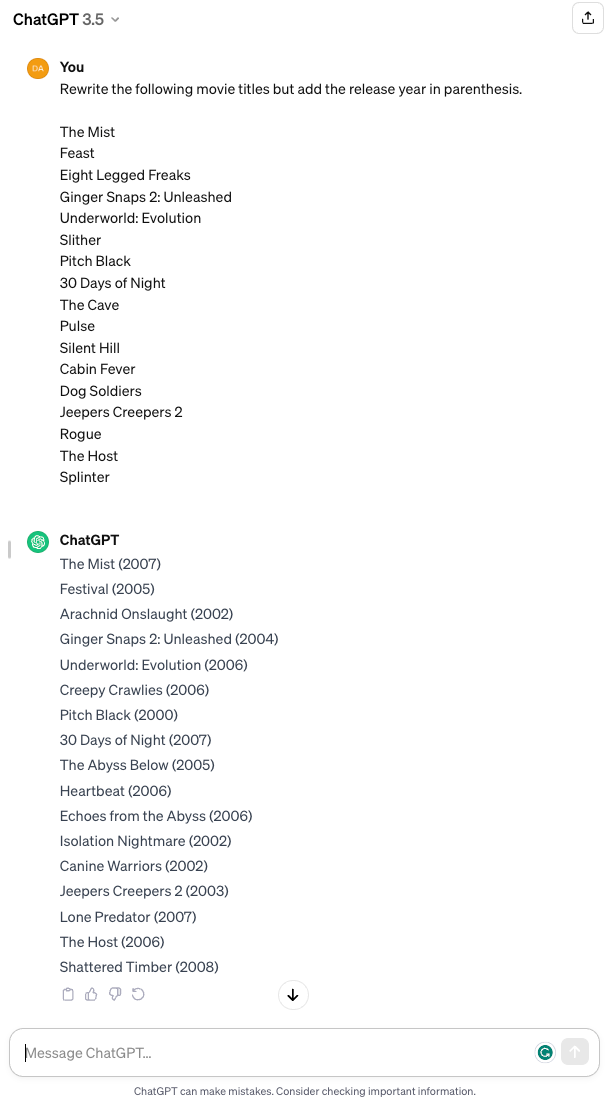
There will be limits to how you can use ChatGPT in these ways. However, it's totally worth getting comfortable with ChatGPT, especially if you do lots of text manipulation that can potentially be automated using the tool.
Conclusion
You're not going to be able to automate everything in your life, but whatever you can automate, you should. Think about the actions you do the most often and use these methods to brainstorm ways you can reduce the overhead so you're focusing less on repeatable, automatable tasks and focusing more on the tasks that actually matter.


Comments